2 HCCM Framework
This chapter describes the Hierarchical Control Conceptual Modelling (HCCM) framework which is used to build a conceptual model, aligned with the HCCM standard from lectures, that represents the practical activity, i.e., making paper cars, from Chapter 1.
Working in the same groups as for the practical activity and using this chapter as guidance, over the next two labs you will work through the phases for HCCM modelling shown in Figure 2.1 and complete templates for those steps. In the next lab you will complete phases 1, 2, 3, and start phase 4. The remainder of phase 4 will be completed in the lab after that. Chapter 1 provides a partially completed conceptual model of the car making system that you can use as a starting point.
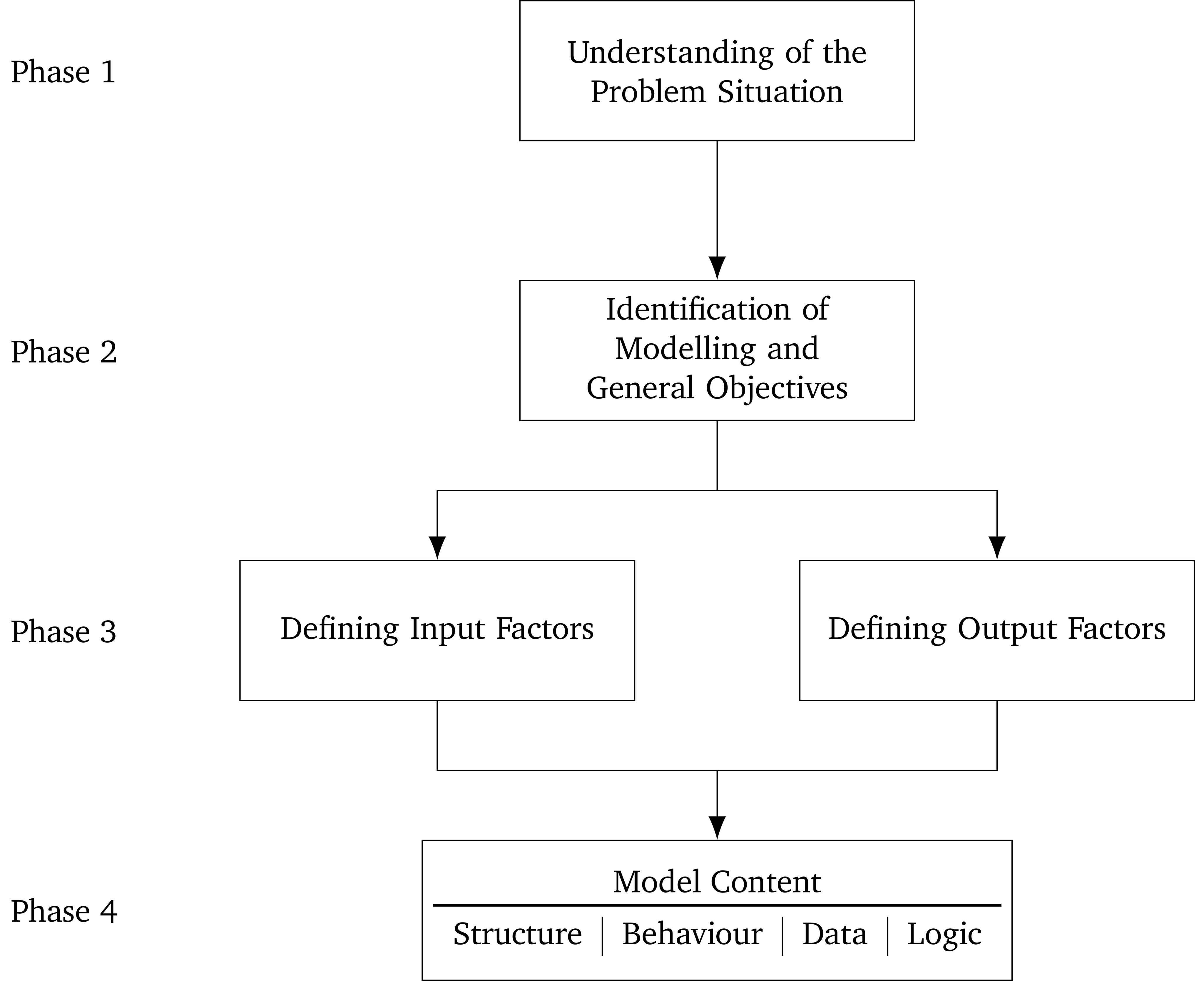
2.1 Understanding of the Problem Situation
In Phase 1, in order to understand the problem situation, you need to summarise what is happening in a concise way. There is no strict rule for the best way to do this. One good approach is listening to the problem “holder”, i.e., person/people who have the problem such as a client, then reflecting what you have heard in a couple of paragraphs with lists of key details and questions. You can then work through one or more iterations of feedback and refinement to get a final, agreed upon problem description.
2.2 Identification of Modelling and General Objectives
For Phase 2, as described in lectures, there are two types of objectives to consider when developing a simulation:
“The second step deals with the determination of the objectives. According to Robinson [26] they drive all aspects of the modeling process and are a subset of an organization’s aims. Further, objectives can be classified into modeling and general objectives, where the latter are concerned with the flexibility, run-speed, visual-display and model/component reuse.”
For the modelling objective you may like to think about what you trying to discover using simulation, and what level of performance you are trying to achieve in which areas/metrics.
2.3 Defining Output Responses
Phase 3 includes defining both the output responses and input factors. You can do these in either order, but it can often be useful to define the output responses first, as it may help you think about what inputs will influence the outputs.
Output responses are things that can be measured and compared to understand how a system has behaved/performed. They are the metrics used to compare different simulation scenarios. The output responses should let you know whether the modelling objectives have been achieved and why or how. You may also want to consider how this will be reported (tables, graphs, etc.).
2.4 Defining Input Factors
Input factors are things that can be changed and may modify how a system behaves/performs. They are often defined to create multiple different scenarios to compare via simulation. They are also what you can change to try and achieve the modelling objectives.
2.5 Model Content
In Phase 4 the model content is defined. There is no strict order in which you need to complete the four components (structre, behaviour, data, and logic). A possible approach, that we will take in this lab, is to:
- Identify the entities;
- Draw the behavioural paths;
- Define the data;
- Define the structure (including the entities again);
- Define the logic.
Using this approach you may still find yourself deciding to add/remove parts that you have already defined. This is a normal part of the conceptual modelling process, and you need to go back to the part of the process you want to change – for example adding and entity or activity – and then update the rest of the CM.
For the model content definition of our conceptual model we will follow the new HCCM standard. This standard is presented in an academic article (currently under review) that is available on Canvas under Modules > Conceptual Modelling in the file hccm-standard.pdf
2.5.1 Identifying Entities
Before formally defining entities it is often useful to identify entities in the system and whether they are active, i.e., have behaviour like a doctor or patient, or passive, i.e., are part of the system that should be modelled but that don’t have explicit behaviour like a waiting room with a given capacity, but that doesn’t actually have defined actions.
The goal is to identify everything that is involved in a meaningful way in all of the activities that are important to the system. Thinking about the inputs and outputs can also be useful. Clearly the entities must be influenced in some way by the inputs, and they must themselves influence the outputs. You may also consider that an activity does not have a significant influence on the performance of the system, and decide to exclude it – and therefore any entities that are involved only in that activity. Likewise the participation of a particular entity in an activity might be deemed inconsequential and therefore excluded. Although it is possible to revisit and add/remove entities later, at this stage you want to consider the whole system carefully, as it is easier to include/exclude an entity now than to change it later.
2.5.2 Drawing Behavioural Paths
Once preliminary identification of entities has been done, behavioural paths for each of the active entities should be drawn. These are essentially flowcharts with a special structure. Circles represent events, usually used when entities are arriving and leaving. Rectangles represent activities, including when entities have to wait for another activity. Red squares at the top left of an activity (or sometimes an event) let us know that some logic is triggered when the activity starts. This generally occurs at the start of “wait” activities and is used to check whether the conditions that mean the entity can stop waiting and move on to the next activity are met.
What we are trying to do when drawing the behavioural paths is identify the activities and events that the entities participate in, the possible orders that these can occur in, and any points where some control logic needs to be used.
Both when identifying the entities and drawing the behavioural paths it is important to keep track of any assumptions and simplifications that you make.
2.5.3 Define the Data
The data for the conceptual model includes both variables, and data modules. Variables can change their value throughout the simulation and are generally used to store some information temporarily before it is required later in the simulation. Data modules contain the information that is needed to perform the simulation and can be collected beforehand. Data mocules can also represent the input/experimental factors – the things that may change between different simulation scenarios. For each data module the following information should be given:
- The name of the data module;
- The source of the data, where the information was obtained;
- The way the data is modelled, is it represented by a constant, a distribution, etc.
- Whether the output is deterministic or stochastic;
- The inputs that the module requires;
- The quantity that the module outputs.
When presenting a conceptual model is useful to put the data first, as it is often referenced throughout the rest of the conceptual model.
2.5.4 Define the Structure
To define the structure we start with formally defining the entities by listing them along with any attributes that they have. Some common attributes, such as ID number and the activity that the entity is currently participating in, are often omitted to avoid repitition. Attributes are usually included either to assist with the system behaviour – for example record whether a patient has had a test – or to capture the perfomance of the system – how long something has waited for.
Next we define the transitions. Each arrow on a behavioural diagram corresponds to a transition. We can collate these in a table describing: the entity that is performing the transition, and the events that the entity transitions from and to. You can simply number them starting from 1, or adopt a convention of using the entity’s initial as a prefix.
Once the transitions have been defined we can define the activities and events. Usually these are presented in two tables, one for the activities and one for the events. For each event (either standalone or as part of an activity) the table should include:
- The participant(s);
- The type – either scheduled or controlled;
- The state changes that occur when the event happens.
The main things that occur in state changes are:
- Schedule an end event – usually in the start event of an activity with a scheduled end event;
- Starting another activity/event – this usually happens in a scheduled end event where an entity is transitioning to another scheduled event;
- Trigger some logic – often in the start event of an activity with a controlled end event.
The simulation start event, and arrive events are often more complicated and involve scheduling the initial events and creating entities.
2.5.5 Define the Logic
The final part of the conceptual model content is the logic. Each trigger that you drew in a behvioural path (the red squares) should correspond first to a trigger statement in the state changes of an event, and a piece of logic defined here. These pieces of logic are used to determine how the system behaves – what activity an entity should do next. It is common to have logic control the behaviour when one entity needs to wait for another, as when the first entity arrives it needs to check whether the other is free to perform an activity with it. The logic is usually presented as pseudocode, alongside the entity that triggers the logic.
2.6 Assumptions and Simplifications
Throughout the four phases of the HCCM framework you should document the assumptions and simplifications that you make. Assumptions are related to uncertainties about the system being modelled, and are used to fill in gaps in the information that is required for the simulation. Simplifications are changes that are made to the model to make it easier to define or implement.